
Free for Chrome and Firefox · Open source

Just download it

Videos, songs, photos and GIFs from the sites you already use, in the quality you pick. Free, and it all happens in your browser.

Both store listings are in review right now. Until then, you can install it from source.

  • No account
  • No ads
  • Nothing uploaded
  • Up to 4K
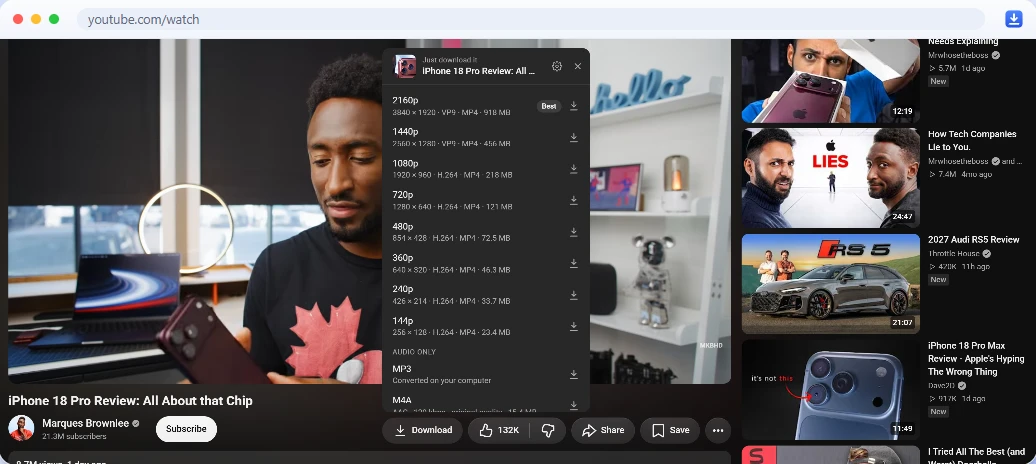
A YouTube video page. Just download it’s Download button sits next to Like, and its quality menu is open, listing 2160p down to 144p, then MP3 and M4A.
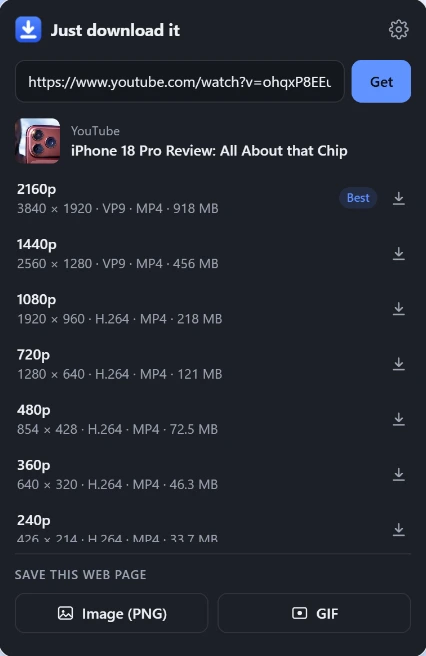
On YouTube, the Download button sits next to Like. Every quality, from 4K down to 144p, plus MP3 and M4A.

Works on

The sites you already use

A Download button on eleven sites, and a right-click menu for everything else.

  • YouTubeVideos up to 4K, MP3, M4A and thumbnails
  • YouTube MusicSongs, albums and playlists as tagged MP3 or M4A
  • SpotifySongs, albums and playlists, tagged, with cover art and previews
  • Apple MusicSongs, albums and playlists, tagged, with cover art up to 3000 px
  • InstagramPosts, carousels, reels, stories, highlights and profile pictures
  • TikTokVideos in every quality, photo slideshows and sounds
  • XOriginal photos, and videos and GIFs in every bitrate
  • TwitchClips, and past broadcasts in every quality or as audio
  • FacebookVideos and reels in HD
  • SnapchatPublic Stories and Spotlight
  • MedalClips in every quality
  • Any other siteRight-click images, video and audio files. Any video’s sound as MP3.

Built in

A Download button, right where you are

No converter sites, no copying links around. The button sits with the site’s own buttons, and its menu is styled to match each site, light or dark.

YouTube
Next to Like
YouTube Music, Spotify, Apple Music
Next to the play buttons, and in the player bar
Instagram
In the post’s action row, after Share
X
In the post’s action bar
Twitch
In the player controls
TikTok, Facebook, Snapchat, Medal
Point at a video and a button appears in its corner
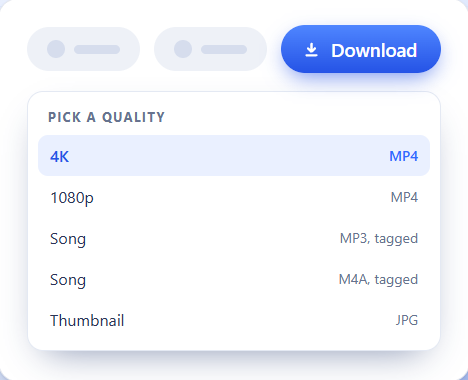
A blue Download button next to a site’s other buttons, with a menu titled Pick a quality: 4K MP4, 1080p MP4, song as MP3 tagged, song as M4A tagged, and the thumbnail as JPG.
  • Every quality the site offers, up to 4K
  • MP3 or M4A of any song, and an MP3 of any video’s sound
  • The thumbnail or cover art as a picture
  • The best one is already picked: press Enter

Anywhere else

Right-click, then just download it

On any site, right-click an image, a video or an audio file and pick Just download media.

  • Finds the biggest version of an image, even behind a “click to enlarge” link, lazy loading or an invisible overlay
  • Saves direct video and audio files, background images and the page’s preview image
  • Right-click a YouTube link or thumbnail to download without opening it
  • Just download web page saves the page itself, as a PNG or a GIF

Any web page

Save a page as an image, or record it as a GIF

Right-click and pick Just download web page, or use the buttons in the toolbar popup.

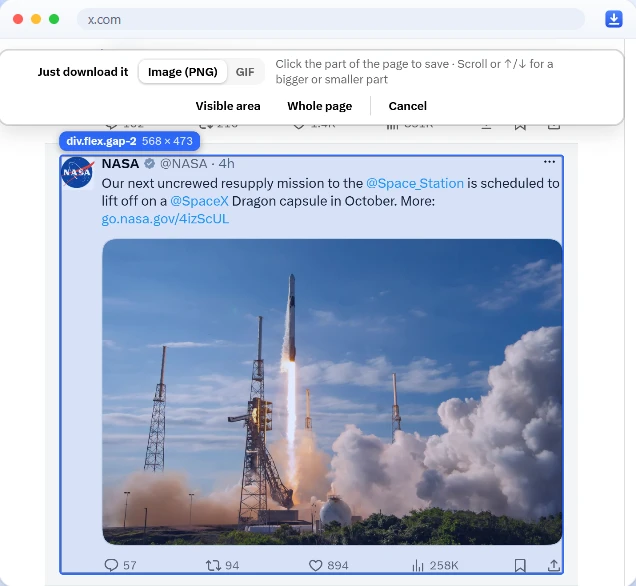
A post on X outlined in blue by the element picker, with its size shown as 568 by 473. A bar at the top offers Image (PNG) or GIF, Visible area, Whole page and Cancel.

As an image (PNG)

Point at the part you want. Scroll, or press , to pick a bigger or smaller part, then click. Parts taller than the screen are saved whole, or take the Visible area or the Whole page.

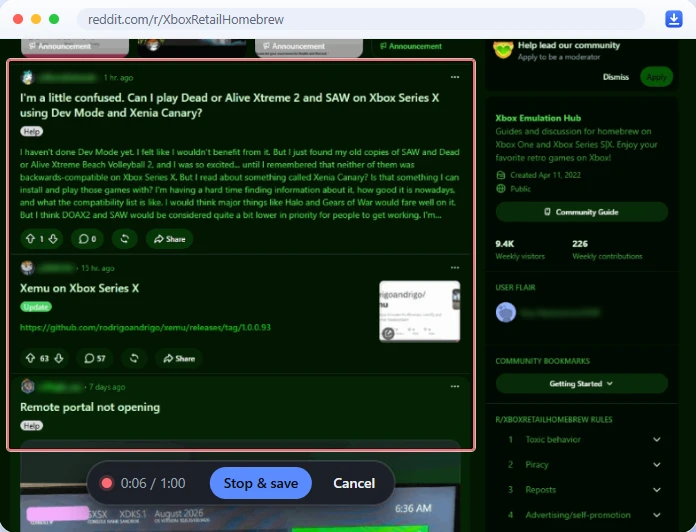
A Reddit feed with the recorded area outlined in red, and a recording bar under it showing 0:06 of 1:00, Stop and save, and Cancel.

As a GIF

Pick an area, then scroll or click around inside it while it records. Press Stop & save. Good for a comment thread, a menu, or anything that moves. The GIF is made by your own browser.

Songs

Songs that show up properly in your music app

From YouTube Music, Spotify and Apple Music, every song is saved as an MP3 or M4A with its title, artist, album and cover art written into the file.

  • MP3 plays everywhere; M4A keeps the audio exactly as it’s streamed, with no conversion
  • Spotify and Apple Music audio is copy-protected, so it’s never touched: the same recording is found on YouTube Music and saved from there
  • Point at MP3 or M4A in the menu to see which recording was found
  • Cover art and 30-second previews come straight from the source

The Weeknd - Blinding Lights.mp3

MP3 · 256 kbps · tags and cover art

Title
Blinding Lights
Artist
The Weeknd
Album
After Hours
Cover art
Embedded

Downloads/Just Download It/Spotify/The Weeknd - Blinding Lights.mp3

Picked on Spotify Found on YouTube Music Tagged on your computer

Albums and playlists

A whole album in one click

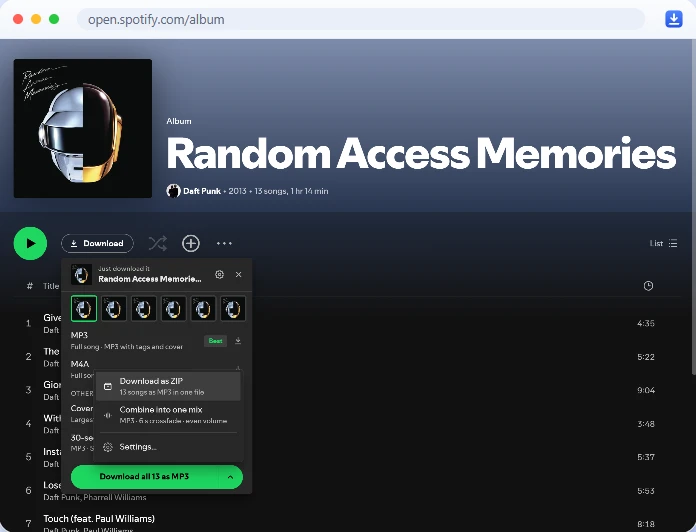
On an album or playlist, Download all saves every song. The arrow next to it has two more.

  1. Separate files

    Numbered 01, 02… in a folder named after the album.

    Spotify/After Hours/01 - The Weeknd - Alone Again.mp3

  2. One ZIP

    Everything in a single file.

  3. One mix

    One long track: silence trimmed, songs faded into each other, the volume evened out, and a tracklist in the file’s comments.

A Spotify album page with the Download button next to Play. The menu shows the album’s songs as MP3 with tags and cover, and the Download all options: Download as ZIP, 13 songs as MP3 in one file, and Combine into one mix, MP3 with a 6 second crossfade and even volume.

Private

It all happens on your computer

There is no Just download it server. Your browser does the work, and your files never go anywhere but your Downloads folder.

  • No server

    Video and sound are joined, MP3s encoded and GIFs recorded by your own browser.

  • No account, no ads

    No sign-up, no paid tier, no analytics. It’s free.

  • Only the site you’re on

    It talks to the site you’re downloading from, and to YouTube Music and Apple’s iTunes search when it’s finding a song and its tags. Nothing else.

  • No remote code

    Everything it runs ships inside the extension. Nothing is fetched and run later.

Settings

Your folders, your file names

Open the settings from the gear in the toolbar popup, or from the right-click menu. Changes save as you make them.

Downloads

Folder inside Downloads
Just Download It
A subfolder for each site
On
Ask where to save each file
Off
Skip the quality menu
Off
Download buttons on sites
On

Songs

File names
Artist - TitleTitle - ArtistTitle
Format
MP3M4A
MP3 quality (kbps)
128192256320
Tags and cover art
On
Number the tracks
On
A folder per album
On

Mixes

Format
MP3M4A
Crossfade
0 to 12 s (6 s)
Even out the volume
On

Sites

Instagram: full quality
On

Shown with their defaults.

How it works

Three steps, and no surprises

  1. Click Download

    Use the button on the site, right-click, or paste a link into the toolbar popup.

  2. Pick a quality

    The menu lists every version the site has. The best is already selected. Arrow keys move, Enter saves, Esc closes.

  3. It lands in Downloads

    Through your browser’s normal downloads. Big jobs show a progress bubble in the corner of the page.

What happens on your computer

Plain files go straight to your browser’s downloads. When a file needs work, such as joining a 4K video’s separate picture and sound, making an MP3, writing tags or recording a GIF, a hidden page inside the extension does it with the open-source Mediabunny library, then hands the finished file to the browser. Long 4K videos, Twitch broadcasts and long playlists can take a while.

Spotify and Apple Music

Their audio is DRM-protected, and the extension never touches it. It reads the song’s title, artist, album and length from their public pages, finds the same recording on YouTube Music, and saves that with the tags and cover art written in. Check the match shown in the menu: now and then it picks a different version.

YouTube

No cookies and no account are used. The extension asks YouTube’s player for a video’s streams the way a YouTube app does. YouTube changes what works every few months, so now and then it needs an update. Age-restricted, private and members-only videos aren’t supported.

Instagram

It asks Instagram for a post only when you click, one request at a time, using the account you’re already logged in with. If Instagram says to slow down, it waits and offers the version shown on the page instead. It’s built for saving things one at a time, not for bulk scraping.

Install

Add it to your browser

Get it from the Chrome Web Store or Firefox Add-ons. It’s free, and it keeps itself up to date.

Version 0.4.0 · Chrome 120+ · Firefox 140+

Both store listings are in review right now. Until then, you can install it from source.

  1. Add it

    Click Add to Chrome or Add to Firefox, then confirm in the box your browser shows.

  2. Open YouTube

    You’ll see the Download button next to Like.

  3. Pin it

    Pin Just download it from the puzzle-piece menu in the toolbar to keep the paste-a-link button handy.

Install from source For developers: load it straight from the code on GitHub

The code is on GitHub. Click Code, then Download ZIP, and unzip it somewhere it can stay, like Documents. Or clone it with git.

Open on GitHub

Chrome

  1. Open the extensions page

    Type this into Chrome’s address bar:

    chrome://extensions
  2. Turn on Developer mode

    It’s the switch in the top-right corner. Leave it on: Chrome turns off extensions loaded this way when it’s off.

  3. Click Load unpacked

    Pick the extension folder inside the project, the one with manifest.json in it, not the project folder itself.

To update, replace the files with the new version, then click the reload icon on the extension’s card.

Firefox

  1. Build the Firefox version

    With Node.js 20 or newer, run npm install and then npm run build:firefox in the project folder. It lands in dist/firefox/.

  2. Open the debugging page

    Type this into Firefox’s address bar:

    about:debugging#/runtime/this-firefox
  3. Click Load Temporary Add-on…

    Pick dist/firefox/manifest.json. If Firefox asks, let it access all websites: it needs that to add its buttons and fetch the files.

Firefox removes temporary add-ons when it restarts, so this is for trying it out. Firefox 140 or newer.

FAQ

Questions

Is it really free?

Yes. There’s no paid tier, no account, no ads and no trial. It costs nothing to run because there’s no server: your browser does all the work.

Is it safe? Does it collect my data?

It collects nothing. There’s no analytics, no account and no remote code, and nothing you download is sent to any server. Requests go only to the site you’re downloading from, plus YouTube Music and Apple’s iTunes search when it’s matching a song and filling in its tags. The privacy policy has the details.

It asks your browser for access to all sites so the Download button and the right-click menu work wherever you are, and so it can fetch the file from the site’s servers. What you browse stays on your computer.

Is it open source?

Yes. All of it is on GitHub under the MIT license, so you can read exactly what it does, build it yourself, or suggest a fix.

The code is plain JavaScript, HTML and CSS, not minified. The two bundled libraries, for video and GIFs, can be rebuilt from their sources with one command.

Why do Spotify and Apple Music songs come from YouTube Music?

Spotify and Apple Music protect their audio with DRM, and the extension never touches it. It reads the song’s title, artist, album and length from their public pages, finds the same recording on YouTube Music, and saves that as an MP3 or M4A with the tags and cover art filled in.

The menu shows which recording it found. Now and then it can pick a different version, like a live take, so it’s worth a glance.

Where do my files go?

Into your normal Downloads folder, in a Just Download It folder with a subfolder for each site. For example:

Downloads/Just Download It/YouTube/Me at the zoo [jNQXAC9IVRw] 1080p.mp4

You can rename the folder, turn off the per-site subfolders, or have your browser ask where to save every file, in the settings.

How do I update it?

You don’t need to. Installed from the Chrome Web Store or Firefox Add-ons, it updates by itself, and your settings stay.

If you installed it from source, replace the files with the new version from GitHub, then click the reload icon on its card in chrome://extensions. In Firefox, build it again and click Reload in about:debugging.

Is there anything it can’t download?

Age-restricted, private and members-only YouTube videos aren’t supported, and copy-protected (DRM) audio and video is never touched. Sites also change how they work from time to time, so a button can stop working until the extension is updated.

See something you want to keep? Just download it.

Free, private and open source. For Chrome and Firefox.

Get it for your browser